Help:DMS-Clone Master Selections
This program option is used to display a list of the Clone Masters based on the selections made on this screen.
Clone Masters are pre-set job templates which can save you key strokes if you do one particular job multiple times.
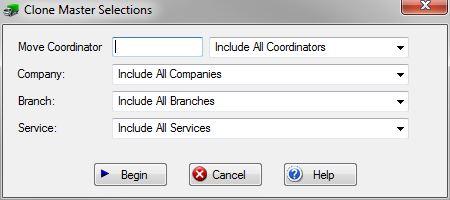
Move Coordinator: If you have permission 41 - Access Jobs for All Coordinators then this field will be blank. You can enter a specific UserID or just leave it blank for all Move Coordinators. You can use the View [?] button to the far right of this field for a list of all active User ID's.
If you do not have permission 41, this field will be pre-set with the UserID of the person logged in and access to active jobs will be limited to this particular User ID.
Company: Use this drop-box to select the specific company whose jobs you wish to see. If you do not have permission 1 - Access All Companies, then this field will be limited to the current logged in company.
Branch: Use this drop-box to select the specific Branch of the company selected in the previous field. If all companies were selected, then this Branch field is unnecessary.
Service: Use this drop-box to select the specific service you wish go include on the display.
File:BeginButton.PNG Press this button to Display the Clone Masters which match the selections made on this screen.
File:CancelButton.PNG Press this button to ignore any selections made on this screen and return to the previous screen.
File:HelpButton.PNG Press this button to call the Help Screen.


