Help:DM1-Carrier Delivery Report
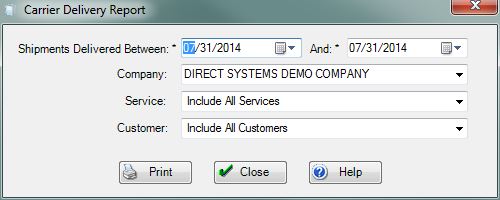
Shipments Delivered Between:, And: Enter the spread of dates you wish to use to generate the report.
Company: Use this dropdown box to select the specific company whose jobs you wish to see. If you do not have permission 1 - Access All Companies, then this field will be limited to the current logged in company.
Service: Use this dropdown box to select the specific service you wish go include in the report. Select Include All Services to display all of the services.
Customer: Use this dropdown box to select the specific Customer you wish go include in the report. Select Include All Customers to display all of the customers from the Customer Name file.
File:PrintButton.PNG Press this button to generate the Contractor's Weekly Report (Outbound) based on the selections made on this screen.
File:CloseButton.PNG Press this button to ignore any selections made on this screen and return to the previous screen.
File:HelpButton.PNG Press this button to call the Help Screen.


