Help:DM1-Big Board User Default Settings
User Defaults are per-user settings that are loaded when the Big Board is first opened. You can also manually load the settings from the top "Tools" tab, open the Maintenance dropdown menu and select "Load User Default Settings".
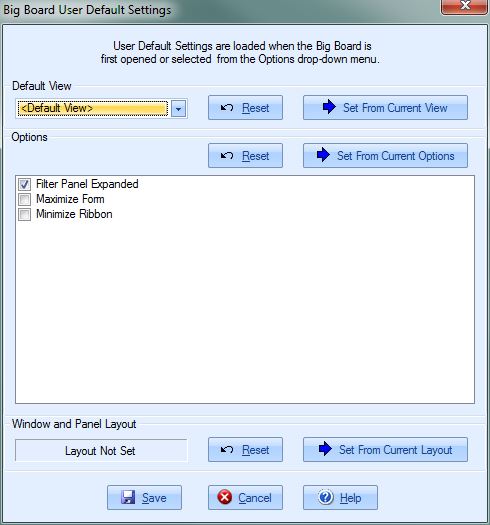
Default View
Select the default Column View that will load when the Big Board opens.
[Reset] Press this button to reset the dropdown box to "Default View".
[Set From Current View] Press this button to set the dropdown box to the currently select View from the Big Board.
Options
[Reset] Press this button to reset to default options.
[Set From Current Options] Press this button to pull the options from the current Big Board.
Filter Panel Expanded This option will expand/collapse the panel titled "Filter" on the Big Board.
Maximize Form This option will maximize the MoverBiz Dispatch Manager form.
Minimize Ribbon This option will minimize the MoverBiz Dispatch Manager form's ribbon. Ribbon is the name for the tabbed, "Office"-style menu at the top of the form.
Window and Panel Layout
These settings will save the position and size of the Driver and Dates windows.
[Reset] Press this button to reset to position and size of the windows.
[Set From Current Layout] Press this button to pull the layout from the current Big Board.
[Save] Press this button to save the User Defaults and apply them to the Big Board.
[Cancel] Press this button to cancel any changes and return to the previous screen.
[Help] Press this button to call the Help screen.

