Help:DM1-Select Standard Letter
This screen allows you to select a Standard Letter to attach to a Job. Standard Letters are correspondence that contain "Replacement Variables" that get replaced with actual Job information from the database. This feature is often called "Mail Merge".
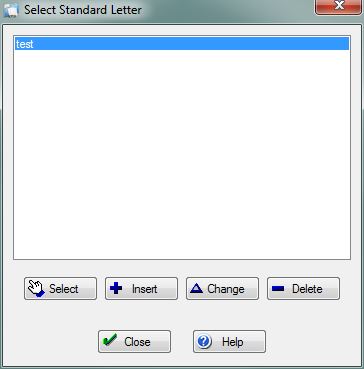
[Select] Press this button to select the currently highlighted Standard Letter. The Letter Editor will open the newly merged document and name it the same as the selected Standard Letter.
[Insert] Press this button to open the Insert Letter screen. From here you can create a Standard Letter from scratch. You will have access to all the available replacement variables in Customer Service/Dispatch Manager.
[Change] Press this button to open the Edit Letter screen. From here you can make changes to an existing Standard Letter. Please note: If you do not have permission 71 then this button will be grayed out.
[Delete] Press this button to remove the selected Standard Letter. You will be prompted to confirm the deletion. Please note: If you do not have permission 71 then this button will be grayed out.
File:CloseButton.PNG Press this button to return to the previous screen.
File:HelpButton.PNG Press this button to call the Help Screen.


