MoverBiz:Screenshots
From DirectWiki
MoverBiz Dispatch Manager Screenshots
The following screenshots will provide an exclusive sneak peek at the new MoverBiz Dispatch Manager. With a Microsoft Visual Basic .NET front end and a Microsoft SQL Server 2008 back end, this module is the powerhouse of our move management software. Since we are still in production, some shots maybe be incomplete or display test data.

|
Important: Please contact us if you would like to provide feedback, need additional information or want to schedule demo of the new Dispatch Manager. |

Modern Interface
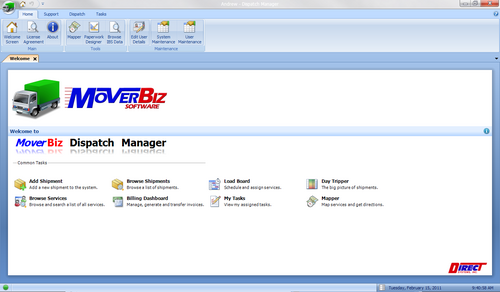
- All of the MoverBiz modules sport a sleek and modern user interface. The main form uses the familiar Office 2007 Ribbon UI, formally known as Fluent, with a main menu button that provides access to every function in the system.
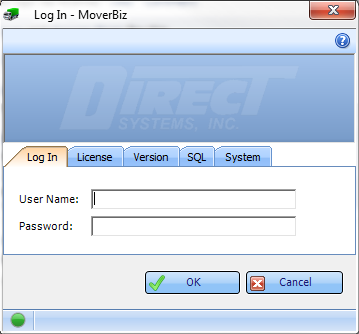
- MoverBiz is true multi-company. Log in once to gain permission based access to all of the companies and branches within the enterprise. Sensitive user information is also password protected after log in to provide additional security.
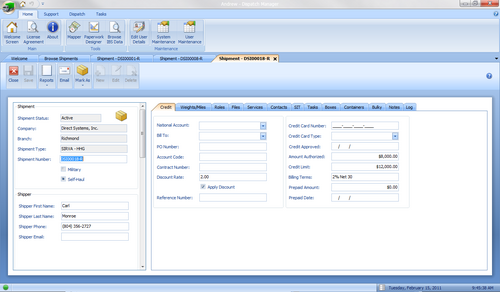
- New documents open as tabs instead of floating windows and allows users to have multiples documents open at once. Navigate between documents with a single click.
- MoverBiz windows may be “docked” anywhere within the main window. This allows Move Coordinators, Customer Service Agents, Dispatchers or anyone else to view and edit data while referencing another window at the same time.

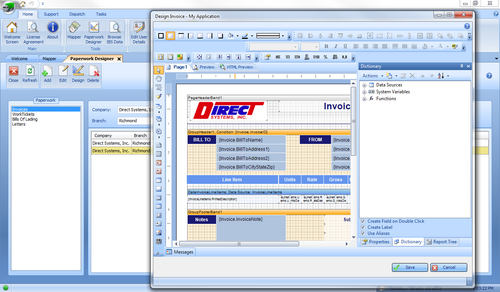
- Design custom paperwork including invoices, work tickets and bills of lading.
Shipments
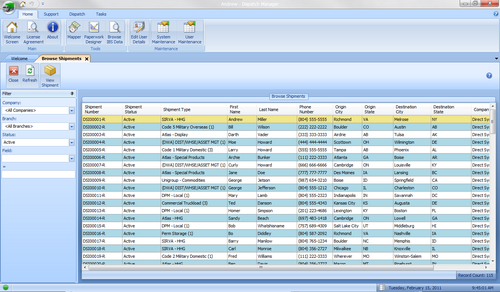
- The Browse Shipment screen allows MoverBiz users to quickly locate a shipment. Each of the column headers in the Browse screen allows for sorting ascending and descending. Additionally, filters at the top of the screen allow users to narrow the results based on criteria of their choosing.
- Creating a new shipment in MoverBiz is a snap. Simply select the Shipment Type, Company and Branch from user-defined dropdowns, enter the customer name and phone number and that’s it! Also, utilizing Direct’s unique Task Manager when creating a new shipment will automatically assign tasks to designated personnel. Stay on top of your Customer relations with the Task Manager.

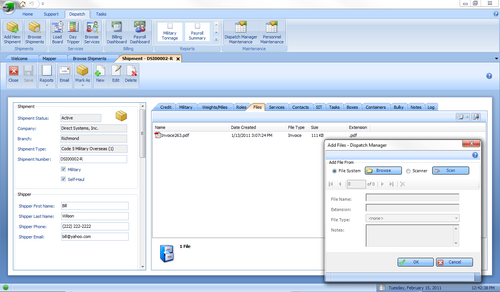
- Attach electronic documents to a shipment for lightning fast retrieval. No more sifting through boxes in the warehouse trying to find that misplaced invoice. Our “Add Files” interface makes it a breeze to select an existing file or scan a document right into the system. Email files directly from the shipment details screen.
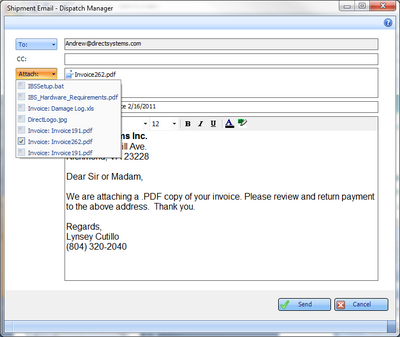
- Select from multiple e-mail addresses and attach electronic documents that are saved to the shipment such as invoices and work tickets. Fully configurable SMTP settings allow for use of popular web mail clients like Gmail or Yahoo.
Services
- The MoverBiz Load Board has a whole new look and feel to it as well as an easy to use interface! To schedule a service, simply drag it from the list to the schedule. Need personnel for the service? No problem. Drag and drop. Need to reschedule a service? Easy. Simply click on the service and drag it to the desired day and time. Done. View a single day or up to a week at a time for a snapshot of the company workload. Generate custom work tickets directly from the Load Board.

- Once a service has been completed, recording the personnel hours for the service can be done with just a few clicks. The begin time and end time for the service are used as the default for each employee, but may be changed at will. Simply check a box and click a button and the service is marked as complete.

- Tired of having to get up and walk over to the Load Board in your office to see what’s scheduled? Wish there was a better way to instantly see what’s in the pipeline? Now there is! (Well, once we finish development.) Our “Day Tripper” will replace that 4 x 8 sheet of plywood hanging on the wall. From your desktop, see every day of the month and those services that are scheduled. Hover over a service and the details for the service are displayed. And the best thing is that as Dispatchers schedule services, the Load Board is automatically updated. And for those of you that just can’t live without that big picture on the wall, PROJECT IT! That’s right, hook up an overhead projector to a PC and display up to the minute info anywhere you want!

Billing
- The Billing Dashboard serves as a hub for the Billing Coordinator to monitor all active shipments and to manage invoices. Invoices may be created, edited or deleted. When it’s time to generate an invoice, simply click a button and choose from the custom invoice you wish to produce. Once an invoice has been generated it can be saved electronically in over 20 different file formats. With a few clicks of the mouse, the electronic invoice can be permanently attached to the shipment. No more boxes of old invoices taking up warehouse space!

- The Edit Invoice screen is laid out in a clean and concise manner. From here, the Billing Coordinator can quickly and easily add billing charges and commission charges. The invoice address can be sent to a number of different locations and can be filled in with 2 clicks, reducing data entry and saving time. And remember, the shipment screen may be opened right next to the Invoice screen for instant reference.

Mapper
- Map service locations and get multiple segment directions using either Google Maps or Mapquest. Print out a copy of the map or save it to the shipment files where it can then be emailed to the driver.

Task Manager
- The Task Manager is an effective way for Move Coordinators, Estimators and Customer Service Agents to manage and track those things that need to be done as part of the move. The Task Supervisor Dashboard provides a quick overview of all tasks in the system and allows for the assignment of tasks to company personnel. For Customer Service, Sales and Office personnel, the Task Manager serves as a “To Do” list of those things they need to accomplish to keep your business moving smoothly and to bring in new business. The Task Manager ensures that things don’t “fall through the cracks”.
Paperwork Designer
- Design custom paperwork including invoices, work tickets and bills of lading.

Maintenance
- As with any computer system, periodic maintenance of the data tables used by the system is required. The MoverBiz software allows for this through an intuitive and easy to use interface. When you purchase MoverBiz, these tables will be populated as part of the installation and setup based upon existing data. No need to worry about extensive start-up and long hours spent tediously keying in data. We can handle it.


