Help:DM1-Recent Activity Report
This report shows you the audit trail for a select number of Jobs. It is helpful for determining who is doing what within the system. It can also be used to view activity on Jobs that have entered the system or have been updated through external sources such as one of our Van Line Connect products.
Entry Sources
| Id | Description |
|---|---|
| 0 | Add New Company Job |
| 1 | Update Job |
| 2 | Update 1780 (History) |
| 3 | Dispatch Management |
| 4 | Transfer To A/R |
| 5 | Transfer From Sales |
| 6 | Import Job |
| 7 | Notes from Other Source |
| 8 | Task Manager |
| A | Atlas Download |
| C | Data Conversion |
| D | Allied Download |
| N | NAVL Download |
| U | Unigroup Download |
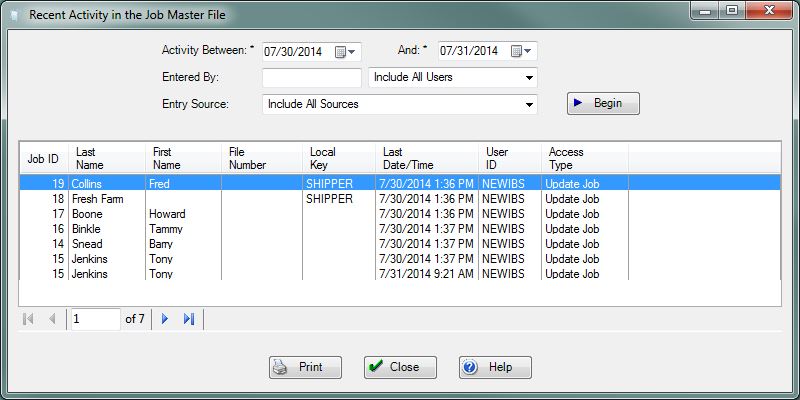
Activity Between:, And: Enter the spread of dates you wish to search for job activity.
Note: If you wish to include all cancelled jobs in the database, then set the beginning date to "01/01/1980".
Entered By: Enter the UserID into the textbox or select from the dropdown box to specify who performed the activity. Enter "" or select "Include All Users" to include all. Select "ATLAS" to see activity from the Atlas Connect service.
Entry Source: Select the source of the activity. See the table of entry sources at the top of the page.
File:BeginButton.PNG Press this button to Display the activity entries which match the selections made on this screen.
File:PrintButton.PNG Press this button to print the listing of entries.
File:CancelButton.PNG Press this button to ignore any selections made on this screen and return to the previous screen.
File:HelpButton.PNG Press this button to call the Help Screen.


