Help:Common-Add Edit Extension
This screen allows you to add a new file extension or update an existing extension that can be used to identify how certain file types are handled.
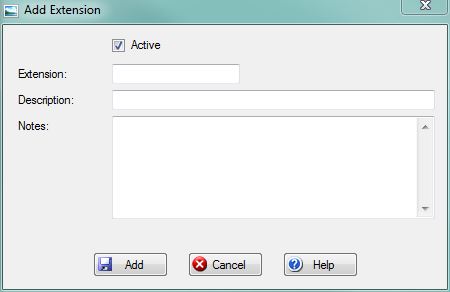
[x] Active: Use this checkbox to specify whether the Extension record is Active or not.
Extension: Type the file extension into the textbox with the proceeding period. For example, type ".txt" without the quotation marks for a Text files. If the extension is in an incorrect format then you will be prompted to fix the formatting. If the extension already exists in the database, you will be prompted and given the status of the existing record (Active or not). This box will be disabled when you are editing an existing extension.
Description: This is a short description of the Extension. For example, type "Text Document" without the quotation marks for a .TXT file.
Notes: This is a memo pad to record assitional information about the Extension record.
File:AddButton.PNG or File:SaveButton.PNG Press this button to Insert or Update the file extension in the system. If any validation rules need attention, you will be prompted with a red exclamation mark beside the offending field.
File:CancelButton.PNG Press this button to cancel and return to the previous screen.
File:HelpButton.PNG Press this button to call the Help Screen.


