Help:Common-Changing an Image Record
This screen allows you to Edit an Image record in the database.

|
Important: You CANNOT edit the actual file from this screen. To replace an attached image you will need to Insert the updated file, copy the Description & Notes from the existing image, and finally, delete the old image. |
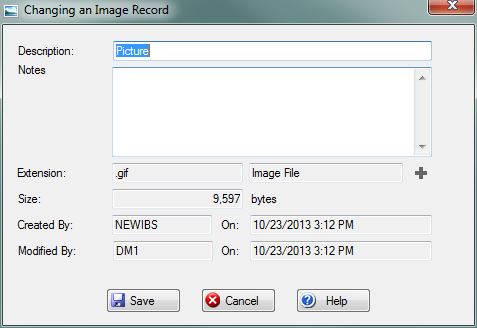
Description: This is a short description of the Image file. This will be used as the file name if you export the Image.
Notes: This is memo pad to record additional information about the Image File.
Extension: This displays the file extension of the Image. The textbox is not editable and is automatically filled out when the Image is first added. If the extension is unknown, the Plus(+) button will be enabled and allow you to add the extension to the system.
Size: The size of the Image file in bytes.
Created By: This displays the UserID and timestamp from when the Image was first added.
Modified By: This displays the UserID and timestamp from the last time the Image record was modified. Please note: This is not from the last time the actual file was modified.
File:SaveButton.PNG Press this button to save any changes you have made to the Image record. If any validation rules need attention, you will be prompted with a red exclamation mark beside the offending field.
File:CancelButton.PNG Press this button cancel the Save and return to the previous screen.
File:HelpButton.PNG Press this button to call the Help Screen.


