Help:DMCommon-Change Service
This screen enables you to change the Service Control type for this Job.
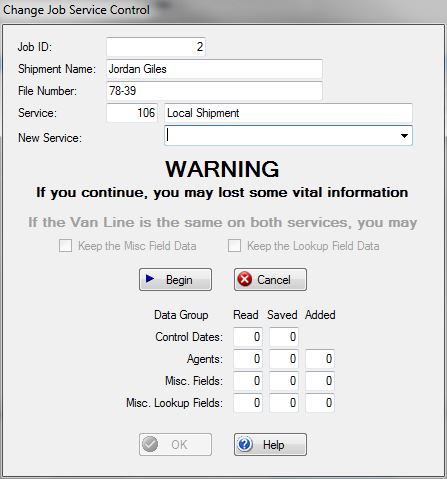
The Job Service Control plays a vital role in which fields are available and the specific choices attached to those fields. See File - Enterprise Files Utilities - Job Service Control File for the setup information on each Job Service control.
Here is what is being changed:
Control Dates: Since every Job Service Control probably has the same or similar dates, the Control Dates which have the same Link ID in both services are kept otherwise they are removed.
Agents: Agents are specific to a Van Line. If the Van Line is the same on both the current and the new Job Service Control types, then the Agents will be kept as long as the Prompt Description is the same in both codes otherwise they are removed.
Misc Fields: The Misc Data Fields are Job Service Control specific. If the Van Line is the same on both Job Service Control types, chances are that the Misc fields will be similar in both types. If the Line Numbers match in both Service Control Types, then the data can be retained.
Misc Lookup Fields: The Misc Lookup Fields are Job Service Control specific. If the Van Line is the same on both Job Service Control types, chances are that the Misc Lookup fields will be similar in both types. If the Line Numbers match in both Service Control Types, then the data can be retained.
Job ID: This field displays the Job ID of the job whose service control type is to be changed
Shipment Name: This field displays the name of the job.
File Number: This field displays the File Number of the job.
Service: These fields display the current Service Control number and description of the service.
New Service: Use this drop-box to select the Service control to which you wish to change this job.
If the Van Line is the same on both the old and the new Service control, you will have two additional options:
[X] Keep the Misc Field Data Check this box if you wish to keep the data that currently exists in the Misc fields of the old Service control if similar fields exist in the new Service control. Uncheck this box to remove all of the Misc Data.
[X] Keep the Lookup Field data Check this box if you wish to keep the data that currently exists in the Misc Lookup fields of the old Service control if similar lookup fields exist in the new Service control. Uncheck this box to remove all of the Misc Lookup Data.
File:BeginButton.PNG Press this button to begin the process. Once this button is pressed, you will not be able to cancel this procedure.
File:CancelButton.PNG Press this button to cancel this operation and return to the previous screen. This button must be pressed BEFORE the [Begin] button is pressed.
File:OKButton.PNG This button will become available after the operation has finished. Press this button to return to the previous screen.
File:HelpButton.PNG Press this button to call the Help Screen.


