Help:DM1-Add Edit Van Line Agent
This screen allows you to add or update a Van Line Agent link for an Agency involved in Atlas Connect. You cannot add duplicate Agency Codes or Company/Branch combinations.
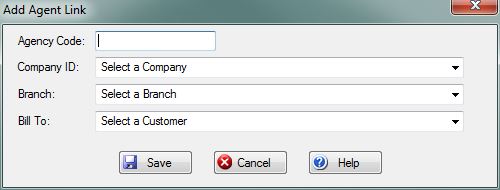
Agency Code: Enter the Agency Code.
Company ID: Select the Company from this dropdown box.
Branch: Select the Branch from this dropdown box. You must first select a Company.
Bill To: Select the Atlas Bill-To from this dropdown box. You must first select a Company.
File:SaveButton.PNG Press this button to Insert or Update the Van Line Agency link record. If any validation rules need attention, you will be prompted with a red exclamation mark beside the offending field.
File:CancelButton.PNG Press this button to cancel and return to the previous screen.
File:HelpButton.PNG Press this button to call the Help Screen.


