Help:DM1-Print Work Tickets/Dispatch Listing: Difference between revisions
From DirectWiki
added frame |
added content |
||
| Line 2: | Line 2: | ||
{{Page title|Print Work Tickets / Dispatch Listing}} | {{Page title|Print Work Tickets / Dispatch Listing}} | ||
This screen allows you to print the current Load Board selection as either Work Tickets or Dispatch List under Paperwork Formats. | |||
[[File:DMS_Print_Work_Listing.JPG|link=]] | [[File:DMS_Print_Work_Listing.JPG|link=]] | ||
'''Spread From:''' Verify the start spread date for the Work Tickets you are printing. | |||
'''Spread To:''' Verify the end spread date for the Work Tickets you are printing. | |||
'''Work Ticket Status:''' You cannot print Pending and Scheduled Work tickets together so you must select which status you want to print. | |||
'''[OK]''' Press this button to kick off the printing process. | |||
'''[Cancel]''' Press this button to return to the previous screen without printing. | |||
'''[Help]''' Press this button to call the Help Screen. | |||
Latest revision as of 20:01, 4 August 2014
Print Work Tickets / Dispatch Listing
This screen allows you to print the current Load Board selection as either Work Tickets or Dispatch List under Paperwork Formats.
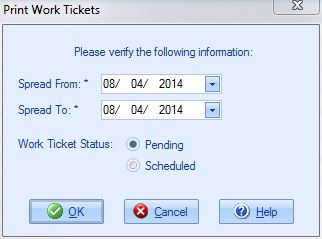
Spread From: Verify the start spread date for the Work Tickets you are printing.
Spread To: Verify the end spread date for the Work Tickets you are printing.
Work Ticket Status: You cannot print Pending and Scheduled Work tickets together so you must select which status you want to print.
[OK] Press this button to kick off the printing process.
[Cancel] Press this button to return to the previous screen without printing.
[Help] Press this button to call the Help Screen.

