Help:DM1-Change Service Lock Status: Difference between revisions
From DirectWiki
added frame |
added content |
||
| Line 2: | Line 2: | ||
{{Page title|Change Service Lock Status}} | {{Page title|Change Service Lock Status}} | ||
This screen allows you to lock/unlock the Atlas Connect service. Locking the service will prevent any SUDs downloads from being imported into the Dispatch Manager. The SUDs files will still get downloaded on the server-side but they will sit there, unprocessed, until the service is unlocked. | |||
[[File:DMS_Van_Line_Service_Lock.JPG|link=]] | [[File:DMS_Van_Line_Service_Lock.JPG|link=]] | ||
'''[Change Status]''' Press this button to change the lock status between Locked and Unlocked. | |||
[[File:SaveButton.PNG|link=]] Press this button to save any change you have made to the Service Lock Status. | |||
[[File:CloseButton.PNG|link=]] Press this button to cancel any changes and return to the previous screen. | |||
[[File:HelpButton.PNG|link=]] Press this button to call the Help Screen. | |||
Latest revision as of 19:49, 4 August 2014
Change Service Lock Status
This screen allows you to lock/unlock the Atlas Connect service. Locking the service will prevent any SUDs downloads from being imported into the Dispatch Manager. The SUDs files will still get downloaded on the server-side but they will sit there, unprocessed, until the service is unlocked.
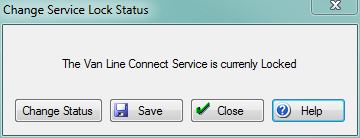
[Change Status] Press this button to change the lock status between Locked and Unlocked.
File:SaveButton.PNG Press this button to save any change you have made to the Service Lock Status.
File:CloseButton.PNG Press this button to cancel any changes and return to the previous screen.
File:HelpButton.PNG Press this button to call the Help Screen.


