Help:DM1-Update the Atlas History File: Difference between revisions
From DirectWiki
added frame |
added content |
||
| Line 2: | Line 2: | ||
{{Page title|Update the Atlas History File}} | {{Page title|Update the Atlas History File}} | ||
This screen allows you to identify the existing Atlas shipments in your system. It is typically run one time before the Atlas Connect service is started. If you do not have any historical Atlas shipments, then this screen does not pertain to you. | |||
[[File:DMS_Atlas_Update_History.JPG|link=]] | [[File:DMS_Atlas_Update_History.JPG|link=]] | ||
'''Begin Date:''' Select the cut-off date for this process. We suggest going back a year or as long as you have been downloading Atlas shipments into IBS. | |||
[[File:BeginButton.PNG|link=]] Press this button to start the update process. The number of records read and added will be displayed on the screen as well as the start and finish time. | |||
[[File:CancelButton.PNG|link=]] Press this button to return to the previous screen. | |||
[[File:HelpButton.PNG|link=]] Press this button to call the Help Screen. | |||
Latest revision as of 19:42, 4 August 2014
Update the Atlas History File
This screen allows you to identify the existing Atlas shipments in your system. It is typically run one time before the Atlas Connect service is started. If you do not have any historical Atlas shipments, then this screen does not pertain to you.
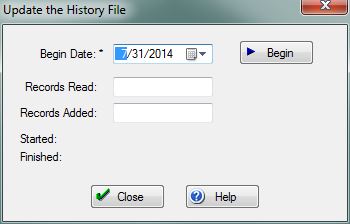
Begin Date: Select the cut-off date for this process. We suggest going back a year or as long as you have been downloading Atlas shipments into IBS.
File:BeginButton.PNG Press this button to start the update process. The number of records read and added will be displayed on the screen as well as the start and finish time.
File:CancelButton.PNG Press this button to return to the previous screen.
File:HelpButton.PNG Press this button to call the Help Screen.


