Help:DM1-Add Edit Van Line Agent: Difference between revisions
added frame |
added content |
||
| Line 2: | Line 2: | ||
{{Page title|Add / Edit Van Line Agent}} | {{Page title|Add / Edit Van Line Agent}} | ||
This screen allows you to add or update a Van Line Agent link for an Agency involved in Atlas Connect. You cannot add duplicate Agency Codes or Company/Branch combinations. | |||
[[File:DMS_Atlas_Standard_Setting_Add_Edit_Agent.JPG|link=]] | [[File:DMS_Atlas_Standard_Setting_Add_Edit_Agent.JPG|link=]] | ||
'''Agency Code:''' Enter the Agency Code. | |||
'''Company ID:''' Select the Company from this dropdown box. | |||
'''Branch:''' Select the Branch from this dropdown box. You must first select a Company. | |||
'''Bill To:''' Select the Atlas Bill-To from this dropdown box. You must first select a Company. | |||
[[File:SaveButton.PNG|link=]] Press this button to Insert or Update the Van Line Agency link record. If any validation rules need attention, you will be prompted with a red exclamation mark beside the offending field. | |||
[[File:CancelButton.PNG|link=]] Press this button to cancel and return to the previous screen. | |||
[[File:HelpButton.PNG|link=]] Press this button to call the Help Screen. | |||
Latest revision as of 19:32, 4 August 2014
This screen allows you to add or update a Van Line Agent link for an Agency involved in Atlas Connect. You cannot add duplicate Agency Codes or Company/Branch combinations.
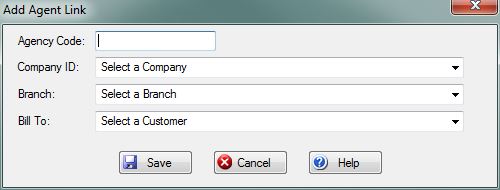
Agency Code: Enter the Agency Code.
Company ID: Select the Company from this dropdown box.
Branch: Select the Branch from this dropdown box. You must first select a Company.
Bill To: Select the Atlas Bill-To from this dropdown box. You must first select a Company.
File:SaveButton.PNG Press this button to Insert or Update the Van Line Agency link record. If any validation rules need attention, you will be prompted with a red exclamation mark beside the offending field.
File:CancelButton.PNG Press this button to cancel and return to the previous screen.
File:HelpButton.PNG Press this button to call the Help Screen.


