Help:DM1-Inbound Information Report: Difference between revisions
added frame |
added content |
||
| Line 5: | Line 5: | ||
[[File:DMS_Inbound_Information_Report.JPG|link=]] | [[File:DMS_Inbound_Information_Report.JPG|link=]] | ||
'''Company:''' Use this dropdown box to select the specific company whose jobs you wish to see. If you do not have permission 1 - Access All Companies, then this field will be limited to the current logged in company. | |||
'''Shipments Received On:''' The report will only include Shipments that were received on the selected date. | |||
'''DPM Inbound Service:''' Use this dropdown box to select the DPM Inbound Service. | |||
'''[x] Include PA Number''' Selecting this option will include the PA Number in the generated report. | |||
[[File:PrintButton.PNG|link=]] Press this button to generate the Inbound Information Report based on the selections made on this screen. | |||
[[File:CloseButton.PNG|link=]] Press this button to ignore any selections made on this screen and return to the previous screen. | |||
[[File:HelpButton.PNG|link=]] Press this button to call the Help Screen. | |||
Latest revision as of 17:03, 1 August 2014
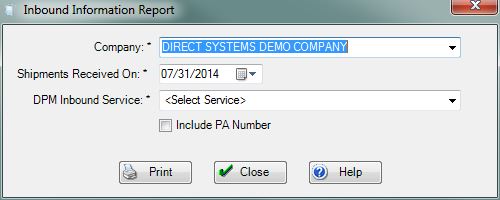
Company: Use this dropdown box to select the specific company whose jobs you wish to see. If you do not have permission 1 - Access All Companies, then this field will be limited to the current logged in company.
Shipments Received On: The report will only include Shipments that were received on the selected date.
DPM Inbound Service: Use this dropdown box to select the DPM Inbound Service.
[x] Include PA Number Selecting this option will include the PA Number in the generated report.
File:PrintButton.PNG Press this button to generate the Inbound Information Report based on the selections made on this screen.
File:CloseButton.PNG Press this button to ignore any selections made on this screen and return to the previous screen.
File:HelpButton.PNG Press this button to call the Help Screen.


