Help:DM1-Contractors Weekly Report Outbound: Difference between revisions
added frame |
added content |
||
| Line 5: | Line 5: | ||
[[File:DMS_Contractors_Weekly_Report.JPG|link=]] | [[File:DMS_Contractors_Weekly_Report.JPG|link=]] | ||
'''Company:''' Use this dropdown box to select the specific company whose jobs you wish to see. If you do not have permission 1 - Access All Companies, then this field will be limited to the current logged in company. | |||
'''Shipments On Hand as of:''' The cut-off date for Shipments you have on hand. | |||
'''Which Were Received Before''' The report will only include Shipments that were received before this date. | |||
'''DPM Outbound Service''' Use this dropdown box to select the DPM Outbound Service. | |||
[[File:PrintButton.PNG|link=]] Press this button to generate the Contractor's Weekly Report (Outbound) based on the selections made on this screen. | |||
[[File:CloseButton.PNG|link=]] Press this button to ignore any selections made on this screen and return to the previous screen. | |||
[[File:HelpButton.PNG|link=]] Press this button to call the Help Screen. | |||
Latest revision as of 16:58, 1 August 2014
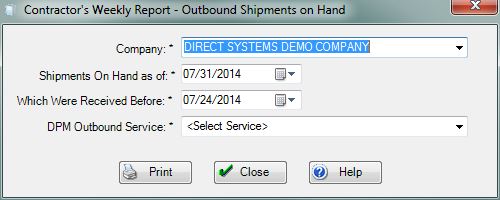
Company: Use this dropdown box to select the specific company whose jobs you wish to see. If you do not have permission 1 - Access All Companies, then this field will be limited to the current logged in company.
Shipments On Hand as of: The cut-off date for Shipments you have on hand.
Which Were Received Before The report will only include Shipments that were received before this date.
DPM Outbound Service Use this dropdown box to select the DPM Outbound Service.
File:PrintButton.PNG Press this button to generate the Contractor's Weekly Report (Outbound) based on the selections made on this screen.
File:CloseButton.PNG Press this button to ignore any selections made on this screen and return to the previous screen.
File:HelpButton.PNG Press this button to call the Help Screen.


