Help:DM1-Default Custom Report Library: Difference between revisions
From DirectWiki
Created page with '__NOTITLE__ {{Page title|Default Custom Report Library}} File:Default_custom_reports.JPG This window gives you access to the custom report library. == Form Layout == …' |
Updated with new screenshot and info |
||
| Line 5: | Line 5: | ||
[[File: | [[File:DMS_Custom_Report_Library.JPG|link=]] | ||
This window gives you access to the custom report library. | This window gives you access to the custom report library. | ||
'''[DPM Reports]''' Press this button to open the [[Help:DM1-DPM_Reports_Menu|DPM Reports Menu]]. | '''[DPM Reports]''' Press this button to open the [[Help:DM1-DPM_Reports_Menu|DPM Reports Menu]]. | ||
Revision as of 18:01, 31 July 2014
Default Custom Report Library
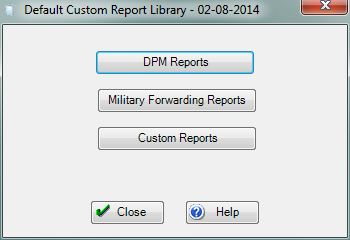
This window gives you access to the custom report library.
[DPM Reports] Press this button to open the DPM Reports Menu.
[Military Forwarding Reports] Press this button to open the Military Forwarding Reports Menu.
[Custom Reports] Press this button to access any additional custom reports in the system.
[Close] Press this button to close this window and return to the previous screen.
[Help] Press this button to call the Help Screen.


