Help:DM1-Letter Replacement Variables: Difference between revisions
From DirectWiki
added frame |
added content |
||
| Line 2: | Line 2: | ||
{{Page title|Letter Replacement Variables}} | {{Page title|Letter Replacement Variables}} | ||
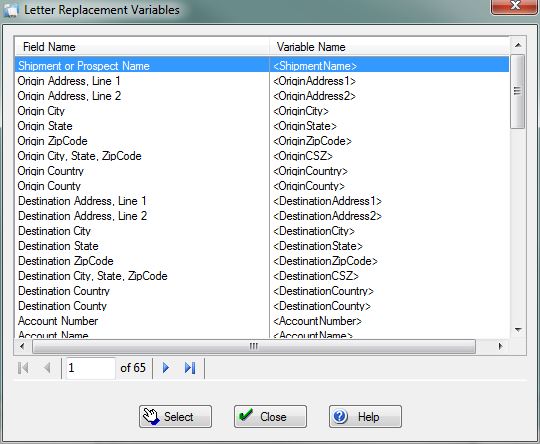
This screen allows you to select from a list of Replacement Variables to insert into a [[Help:DM1-Select_Standard_Letter|Standard Letter]]. The '''Field Name''' column represents the data field that will be pulled from the Job record in the database. The '''Variable Name''' column is the literal string that will be inserted into the document that you are editing. | |||
[[File:DMS_Letter_Replacement_Variables.JPG|link=]] | [[File:DMS_Letter_Replacement_Variables.JPG|link=]] | ||
[[File:SelectButton.PNG|link=]] Press this button to return to select the highlighted Replacement Variable and insert the '''Variable Name''' string into a Standard Letter. | |||
[[File:CloseButton.PNG|link=]] Press this button to return to the previous screen. | |||
[[File:HelpButton.PNG|link=]] Press this button to call the Help Screen. | |||
Latest revision as of 17:34, 4 August 2014
Letter Replacement Variables
This screen allows you to select from a list of Replacement Variables to insert into a Standard Letter. The Field Name column represents the data field that will be pulled from the Job record in the database. The Variable Name column is the literal string that will be inserted into the document that you are editing.
File:SelectButton.PNG Press this button to return to select the highlighted Replacement Variable and insert the Variable Name string into a Standard Letter.
File:CloseButton.PNG Press this button to return to the previous screen.
File:HelpButton.PNG Press this button to call the Help Screen.


