Help:DM1-Select Services for the Big Board: Difference between revisions
From DirectWiki
added frame |
added content |
||
| Line 2: | Line 2: | ||
{{Page title|Select Services for MoverBiz Big Board}} | {{Page title|Select Services for MoverBiz Big Board}} | ||
This screen allows you to select Services that will be displayed on the Big Board. These selections are enterprise-wide, meaning that these are the Services that everyone will see when they open the Big Board. You must have permission 60 to access this screen. | |||
[[File:DMS_Big_Board_Selected_Services.JPG|link=]] | [[File:DMS_Big_Board_Selected_Services.JPG|link=]] | ||
''' [Select All] ''' Press this button to select all of the Services in the list. | |||
''' [Select None] ''' Press this button to unselect all of the Services in the list. | |||
''' [Save] ''' Press this button to save your changes. Once saved, the Service dropdown box on the Filter panel will be updated with the new selections. | |||
''' [Cancel] ''' Press this button to cancel any changes and return to the previous screen. | |||
''' [Help] ''' Press this button to open the Help screen. | |||
Latest revision as of 15:08, 6 August 2014
Select Services for MoverBiz Big Board
This screen allows you to select Services that will be displayed on the Big Board. These selections are enterprise-wide, meaning that these are the Services that everyone will see when they open the Big Board. You must have permission 60 to access this screen.
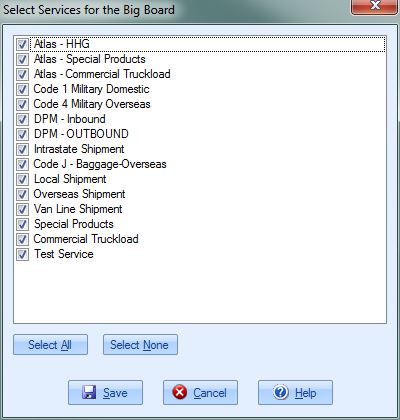
[Select All] Press this button to select all of the Services in the list.
[Select None] Press this button to unselect all of the Services in the list.
[Save] Press this button to save your changes. Once saved, the Service dropdown box on the Filter panel will be updated with the new selections.
[Cancel] Press this button to cancel any changes and return to the previous screen.
[Help] Press this button to open the Help screen.

