Help:SET-Join Jobs on File Number: Difference between revisions
No edit summary |
No edit summary |
||
| Line 6: | Line 6: | ||
{{Important tip| This as an advanced Setup feature that requires [[Help:SET-Support_Login|Support Login]] to access.}} | {{Important tip| This as an advanced Setup feature that requires [[Help:SET-Support_Login|Support Login]] to access.}} | ||
[[File:Join_jobs.JPG|thumb|300px| Join Jobs Main Screen]] | |||
| Line 50: | Line 52: | ||
== Form Layout == | == Form Layout == | ||
[[File:Join_jobs.JPG| | [[File:Join_jobs.JPG|link=]] | ||
'''Service Type:''' Use this drop-box to select a specific Service for the Job analysis. Select 'Include All Services' to remove this filtering. | |||
'''Show All Services:''' Check this box to include all services in the Service Type drop-box, including non-program controlled. (Service ID 100+) | |||
{{Important tip|Narrowing the affected Jobs by Service Type is only effective for Van Line Jobs where the Service Type is under program control. For all other Service Types , please select 'Include All Services' from the dropdown for the most reliable results.}} | |||
'''Active Jobs Only:''' Check this box to only include active Jobs in the Job analysis. | |||
'''[Analyze]''' Press this button to start the Job analysis according to the following criteria: | |||
# Jobs must be of the specified Service Type unless 'Include All Services' is selected | |||
# At least 2 Jobs must be found with duplicate File Number | |||
# At least 1 of the found Jobs must be active if 'Active Jobs Only' is checked | |||
# At least 2 of the found Jobs must have different Company/Branch IDs | |||
== Procedure == | == Procedure == | ||
Revision as of 17:31, 14 August 2013

|
Important: This as an advanced Setup feature that requires Support Login to access. |

This option is used to join Master Job records after a Van Line Agent has completed a Multi-Company conversion.
Permissions
You will be prompted to log in using the Dispatch Log In screen. The DM1 password record must have the following permissions set:
| Permission | Description |
|---|---|
| 01 | Access All Companies |
| 09 | Edit Company Jobs |
| 18 | View Completed Jobs |
| 19 | Remove Shipments |
| 41 | Access Jobs For All Coordinators |
| 51 | Edit Work Tickets |
| 56 | Access Work Tickets For All Dispatchers |
Note: We suggest giving the User full DM1 permissions.
Form Layout
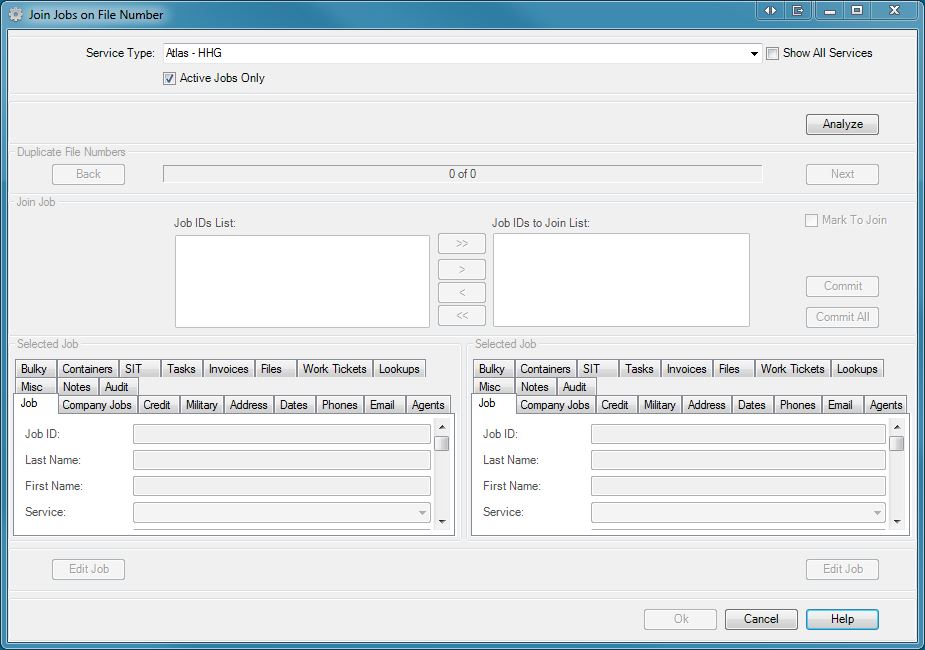
Service Type: Use this drop-box to select a specific Service for the Job analysis. Select 'Include All Services' to remove this filtering.
Show All Services: Check this box to include all services in the Service Type drop-box, including non-program controlled. (Service ID 100+)
|
|
Important: Narrowing the affected Jobs by Service Type is only effective for Van Line Jobs where the Service Type is under program control. For all other Service Types , please select 'Include All Services' from the dropdown for the most reliable results. |
Active Jobs Only: Check this box to only include active Jobs in the Job analysis.
[Analyze] Press this button to start the Job analysis according to the following criteria:
- Jobs must be of the specified Service Type unless 'Include All Services' is selected
- At least 2 Jobs must be found with duplicate File Number
- At least 1 of the found Jobs must be active if 'Active Jobs Only' is checked
- At least 2 of the found Jobs must have different Company/Branch IDs

