Help:DM1-Van Line Memos: Difference between revisions
added frame |
added content |
||
| Line 2: | Line 2: | ||
{{Page title|Van Line Memos}} | {{Page title|Van Line Memos}} | ||
This screen allows you to browse Van Line Memos. | |||
[[File:DMS_Van_Line_Memos.JPG|link=]] | [[File:DMS_Van_Line_Memos.JPG|link=]] | ||
'''View Memos Between... And:''' Select the beginning and end spread date and time. | |||
[[File:BeginButton.PNG|link=]] Press this button to retrieve the memos. | |||
'''Job ID:''' This displays the Job ID of the currently highlighted record. | |||
'''Memo Category:''' This displays the category of the memo, if applicable. | |||
'''Sequence:''' The sequence number of the memo record. | |||
'''Subject:''' The subject line of the memo record. | |||
'''Private:''' This indicates whether the memo is private, if applicable. | |||
'''User Initials:''' This displays the initials of the user that entered the memo, if applicable. | |||
'''Created By/On:''' This displays an audit trail for the memo record. | |||
'''Memo Text:''' This displays the contents of the memo. | |||
'''[Print Listing]''' Press this button to print the grid of memos. | |||
'''[Close]''' Press this button to return to the previous screen. | |||
'''[Help]''' Press this button to call the Help screen. | |||
'''[Print Memo]''' Press this button to print the currently highlighted memo. | |||
Latest revision as of 15:18, 12 August 2014
This screen allows you to browse Van Line Memos.
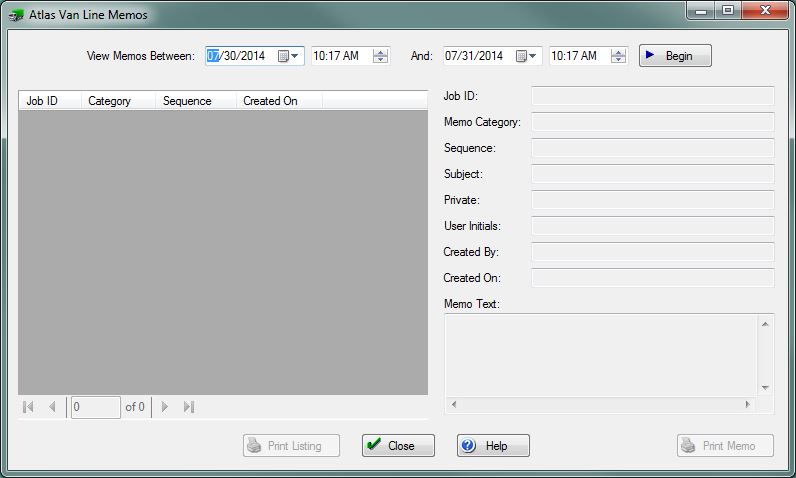
View Memos Between... And: Select the beginning and end spread date and time.
File:BeginButton.PNG Press this button to retrieve the memos.
Job ID: This displays the Job ID of the currently highlighted record.
Memo Category: This displays the category of the memo, if applicable.
Sequence: The sequence number of the memo record.
Subject: The subject line of the memo record.
Private: This indicates whether the memo is private, if applicable.
User Initials: This displays the initials of the user that entered the memo, if applicable.
Created By/On: This displays an audit trail for the memo record.
Memo Text: This displays the contents of the memo.
[Print Listing] Press this button to print the grid of memos.
[Close] Press this button to return to the previous screen.
[Help] Press this button to call the Help screen.
[Print Memo] Press this button to print the currently highlighted memo.


