Help:DM1-Column View Maintenance: Difference between revisions
added frame |
added content |
||
| Line 2: | Line 2: | ||
{{Page title|Column View Maintenance}} | {{Page title|Column View Maintenance}} | ||
This screen allows you to manage Column Views. A Column View is a custom set of fields that are visible in a Grid View as well as a specified Sort Order. Load Board Column Views control the fields in the Work Ticket Grid View while Big Board Column Views control the fields in the Company Job Grid View. | |||
Column Views are available to anyone that can use the Load Board but you must have permission to edit them. | |||
[[File:DMS_Board_View_Maintenance.JPG|link=]] | [[File:DMS_Board_View_Maintenance.JPG|link=]] | ||
'''[x] Active Only''' Check this box to view only active Column Views in the list. It is checked by default. | |||
'''[Insert]''' Press this button to insert a new Column View into the database. | |||
'''[Edit]''' Press this button to edit the highlighted Column View. | |||
'''[Close]''' Press this button to return to the previous screen. | |||
'''[Help]''' Press this button to call the Help screen. | |||
Latest revision as of 17:28, 13 August 2014
This screen allows you to manage Column Views. A Column View is a custom set of fields that are visible in a Grid View as well as a specified Sort Order. Load Board Column Views control the fields in the Work Ticket Grid View while Big Board Column Views control the fields in the Company Job Grid View.
Column Views are available to anyone that can use the Load Board but you must have permission to edit them.
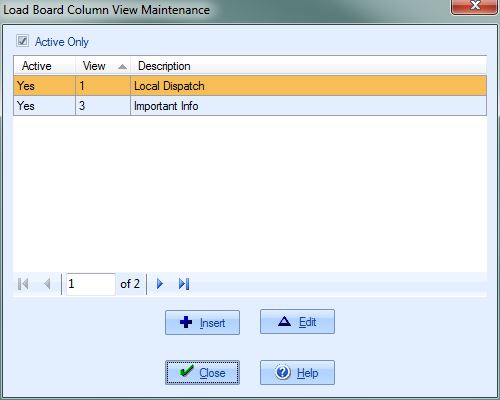
[x] Active Only Check this box to view only active Column Views in the list. It is checked by default.
[Insert] Press this button to insert a new Column View into the database.
[Edit] Press this button to edit the highlighted Column View.
[Close] Press this button to return to the previous screen.
[Help] Press this button to call the Help screen.

