Help:DM1-Export To CSV: Difference between revisions
added content |
No edit summary |
||
| Line 10: | Line 10: | ||
''' Drive and Path: ''' | ''' Drive and Path: ''' Enter or browse for a valid file save location. | ||
Latest revision as of 15:17, 6 August 2014
This screen allows you to export the current result set on the Big Board to a Comma-Separated Value file. Only the columns that are visible in the current Column View will be exported.
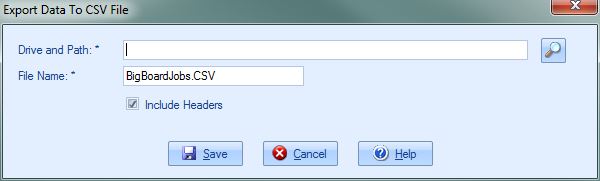
Drive and Path: Enter or browse for a valid file save location.
File Name: Enter the name of the file to export. This field will default to "BigBoardJobs.CSV". Please note that changing the file extension (.CSV) could render the exported file unusable.
[x] Include Headers Select this option to include the field names as the first row in the export.
[Save] Press this button to export to the designated CSV file.
[Cancel] Press this button to cancel the export and return to the previous screen.
[Help] Press this button to open the Help screen.

