MoverBiz:Screenshots-Efficient Invoicing: Difference between revisions
From DirectWiki
Added content |
mNo edit summary |
||
| Line 3: | Line 3: | ||
[[MoverBiz:Screenshots|<< Back to screenshots]]<br/><br/> | [[MoverBiz:Screenshots|<< Back to screenshots]]<br/><br/> | ||
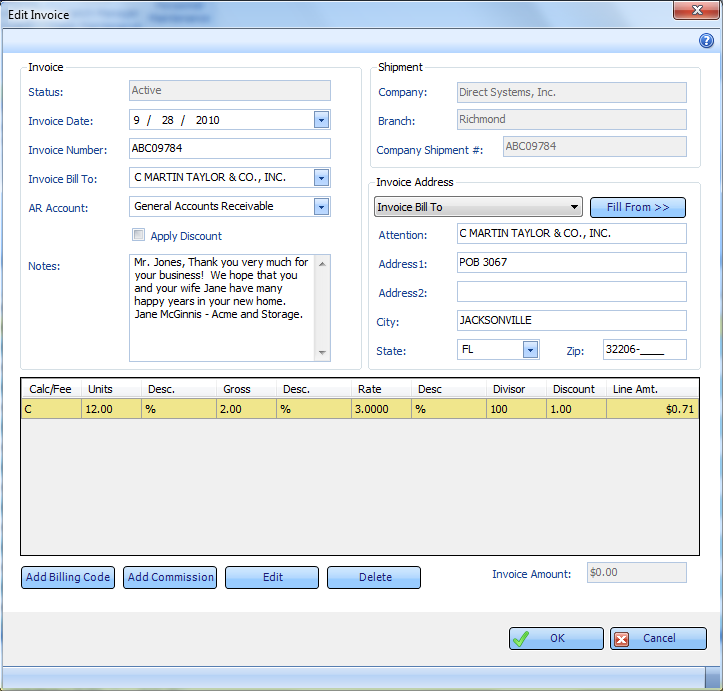
The Edit Invoice screen is laid out in a clean and concise manner. From here, the Billing Coordinator can quickly and easily add billing charges and commission charges. The invoice address can be sent to a number of different locations and can be filled in with 2 clicks, reducing data entry and saving time. The shipment screen may be opened right next to the Invoice screen for instant reference.<br/><br/> | The Edit Invoice screen is laid out in a clean and concise manner. From here, the Billing Coordinator can quickly and easily add billing charges and commission charges. The invoice address can be sent to a number of different locations and can be filled in with 2 clicks, reducing data entry and saving time. The shipment screen may be opened right next to the Invoice screen for instant reference.<br/><br/> | ||
[[File: | [[File:Editinvoice.png|link=]] | ||
Latest revision as of 21:59, 21 February 2011
Efficient Invoicing
<< Back to screenshots
The Edit Invoice screen is laid out in a clean and concise manner. From here, the Billing Coordinator can quickly and easily add billing charges and commission charges. The invoice address can be sent to a number of different locations and can be filled in with 2 clicks, reducing data entry and saving time. The shipment screen may be opened right next to the Invoice screen for instant reference.